CyberSec OTP Input – Midnight Blue Wireframe
<div class="fp-cybersecurity-2fa-otp-input-ui">
    <div class="fp-cybersecurity-2fa-otp-input-ui-stage">
        <div class="fp-cybersecurity-2fa-otp-input-ui-scanner"></div>
        <div class="fp-cybersecurity-2fa-otp-input-ui-wireframe"></div>

        <div class="fp-cybersecurity-2fa-otp-input-ui-ring-container"></div>

        <div class="fp-cybersecurity-2fa-otp-input-ui-content">
            <div class="fp-cybersecurity-2fa-otp-input-ui-header">
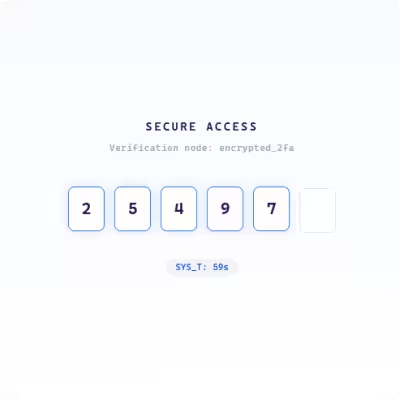
                <p class="fp-cybersecurity-2fa-otp-input-ui-title">Secure Access</p>
                <p class="fp-cybersecurity-2fa-otp-input-ui-subtitle">Verification node: encrypted_2fa</p>
            </div>

            <div class="fp-cybersecurity-2fa-otp-input-ui-slots">
                <div class="fp-cybersecurity-2fa-otp-input-ui-slot"></div>
                <div class="fp-cybersecurity-2fa-otp-input-ui-slot"></div>
                <div class="fp-cybersecurity-2fa-otp-input-ui-slot"></div>
                <div class="fp-cybersecurity-2fa-otp-input-ui-slot"></div>
                <div class="fp-cybersecurity-2fa-otp-input-ui-slot"></div>
                <div class="fp-cybersecurity-2fa-otp-input-ui-slot"></div>
            </div>

            <div class="fp-cybersecurity-2fa-otp-input-ui-footer">
                <div class="fp-cybersecurity-2fa-otp-input-ui-timer">SYS_T: <span class="fp-cybersecurity-2fa-otp-input-ui-time-val">59s</span></div>
            </div>
        </div>
    </div>
</div>
/* ========================================== */
/* 2. CSS STYLES */
/* ========================================== */
.fp-cybersecurity-2fa-otp-input-ui {
--fp-container-width: 100%;
--fp-max-width: 500px;
--fp-aspect-ratio: 1 / 1;
--fp-primary-color: #ffffff;
--fp-secondary-color: #f1f5f9;
--fp-muted-color: #94a3b8;
--fp-soft-color: #e2e8f0;
--fp-background-color: transparent;
--fp-info-color: #1e1b4b;
--fp-warning-color: #2563eb;
--fp-danger-color: #1d4ed8;
--fp-accent-color: #3b82f6;
width: var(--fp-container-width);
max-width: var(--fp-max-width);
margin: 0 auto;
background: var(--fp-background-color);
font-family: ui-monospace, 'Cascadia Code', 'Source Code Pro', Menlo, Consolas, monospace;
box-sizing: border-box;
position: relative;
}
.fp-cybersecurity-2fa-otp-input-ui * {
box-sizing: inherit;
}
.fp-cybersecurity-2fa-otp-input-ui-stage {
aspect-ratio: var(--fp-aspect-ratio);
background: var(--fp-primary-color);
border: 1px solid var(--fp-soft-color);
border-radius: 24px;
display: flex;
align-items: center;
justify-content: center;
position: relative;
overflow: hidden;
box-shadow: 0 10px 30px -10px rgba(30, 27, 75, 0.08);
}
/* Layer 1: Subtle base breathing */
.fp-cybersecurity-2fa-otp-input-ui-scanner {
position: absolute;
width: 100%;
height: 100%;
background: linear-gradient(0deg, transparent 0%, rgba(59, 130, 246, 0.03) 50%, transparent 100%);
background-size: 100% 200%;
animation: fp-cybersecurity-2fa-otp-input-ui-scan 4s ease-in-out infinite;
pointer-events: none;
}
@keyframes fp-cybersecurity-2fa-otp-input-ui-scan {
0% { background-position: 0% 100%; }
100% { background-position: 0% -100%; }
}
/* Layer 2: Rotational Wireframe Background */
.fp-cybersecurity-2fa-otp-input-ui-wireframe {
position: absolute;
width: 80%;
height: 80%;
border: 1px solid var(--fp-secondary-color);
border-radius: 50%;
animation: fp-cybersecurity-2fa-otp-input-ui-rotate 20s linear infinite;
display: flex;
align-items: center;
justify-content: center;
opacity: 0.5;
}
.fp-cybersecurity-2fa-otp-input-ui-wireframe::before {
content: '';
position: absolute;
width: 105%;
height: 105%;
border: 1px dashed var(--fp-soft-color);
border-radius: 50%;
}
@keyframes fp-cybersecurity-2fa-otp-input-ui-rotate {
from { transform: rotate(0deg); }
to { transform: rotate(360deg); }
}
.fp-cybersecurity-2fa-otp-input-ui-content {
position: relative;
z-index: 2;
display: flex;
flex-direction: column;
align-items: center;
gap: 32px;
width: 100%;
padding: 40px;
}
.fp-cybersecurity-2fa-otp-input-ui-header {
text-align: center;
}
.fp-cybersecurity-2fa-otp-input-ui-title {
color: var(--fp-info-color);
font-size: 0.85rem;
font-weight: 700;
letter-spacing: 0.2em;
text-transform: uppercase;
margin: 0 0 8px 0;
}
.fp-cybersecurity-2fa-otp-input-ui-subtitle {
color: var(--fp-muted-color);
font-size: 0.7rem;
letter-spacing: 0.05em;
}
.fp-cybersecurity-2fa-otp-input-ui-slots {
display: flex;
gap: 12px;
}
.fp-cybersecurity-2fa-otp-input-ui-slot {
width: 45px;
height: 55px;
border: 1.5px solid var(--fp-soft-color);
background: var(--fp-primary-color);
display: flex;
align-items: center;
justify-content: center;
font-size: 1.25rem;
font-weight: 700;
color: var(--fp-info-color);
border-radius: 8px;
transition: all 0.2s ease;
}
.fp-cybersecurity-2fa-otp-input-ui-slot.active {
border-color: var(--fp-accent-color);
box-shadow: 0 0 15px rgba(59, 130, 246, 0.2);
transform: translateY(-2px);
}
.fp-cybersecurity-2fa-otp-input-ui-ring-container {
position: absolute;
pointer-events: none;
}
/* Layer 3: Reactive Spike Rings */
.fp-cybersecurity-2fa-otp-input-ui-ring {
position: absolute;
top: 50%;
left: 50%;
transform: translate(-50%, -50%);
border: 2px solid var(--fp-accent-color);
border-radius: 50%;
opacity: 0;
}
@keyframes fp-cybersecurity-2fa-otp-input-ui-expand {
0% { width: 0; height: 0; opacity: 1; border-width: 4px; }
100% { width: 500px; height: 500px; opacity: 0; border-width: 1px; }
}
.fp-cybersecurity-2fa-otp-input-ui-footer {
display: flex;
flex-direction: column;
align-items: center;
gap: 12px;
}
.fp-cybersecurity-2fa-otp-input-ui-timer {
font-size: 0.7rem;
color: var(--fp-danger-color);
font-weight: 600;
background: var(--fp-secondary-color);
padding: 4px 12px;
border-radius: 20px;
}
@media (max-width: 480px) {
.fp-cybersecurity-2fa-otp-input-ui-slots { gap: 8px; }
.fp-cybersecurity-2fa-otp-input-ui-slot { width: 38px; height: 48px; font-size: 1.1rem; }
}/* ========================================== */
/* 3. JAVASCRIPT LOGIC */
/* ========================================== */
(function() {
// Select all instances of the component on the page
const instances = document.querySelectorAll('.fp-cybersecurity-2fa-otp-input-ui');
instances.forEach(root => {
const slots = root.querySelectorAll('.fp-cybersecurity-2fa-otp-input-ui-slot');
const timeVal = root.querySelector('.fp-cybersecurity-2fa-otp-input-ui-time-val');
const ringContainer = root.querySelector('.fp-cybersecurity-2fa-otp-input-ui-ring-container');
let currentIndex = 0;
let timeLeft = 59;
let lastUpdate = 0;
let animationFrame;
// Function to trigger the reactive ring expansion (Layer 3 Spike)
function fp_cybersecurity_2fa_otp_input_ui_createRing() {
const ring = document.createElement('div');
ring.className = 'fp-cybersecurity-2fa-otp-input-ui-ring';
ring.style.animation = 'fp-cybersecurity-2fa-otp-input-ui-expand 0.8s cubic-bezier(0.16, 1, 0.3, 1) forwards';
ringContainer.appendChild(ring);
// Cleanup to prevent memory leaks
setTimeout(() => ring.remove(), 800);
}
// Main JS animation loop
function fp_cybersecurity_2fa_otp_input_ui_update(timestamp) {
if (!document.body.contains(root)) {
cancelAnimationFrame(animationFrame);
return;
}
if (!lastUpdate) lastUpdate = timestamp;
const delta = timestamp - lastUpdate;
// Simulated OTP Input Sequence
if (delta > 600) {
lastUpdate = timestamp;
if (currentIndex < slots.length) {
// Inject random digit and activate state
slots[currentIndex].textContent = Math.floor(Math.random() * 10);
slots[currentIndex].classList.add('active');
fp_cybersecurity_2fa_otp_input_ui_createRing();
currentIndex++;
} else {
// Reset cycle
setTimeout(() => {
slots.forEach(s => {
s.textContent = '';
s.classList.remove('active');
});
currentIndex = 0;
}, 1200);
lastUpdate = timestamp + 1200;
}
// Tick simulation for the timer UI
if (Math.random() > 0.85) {
timeLeft = timeLeft > 0 ? timeLeft - 1 : 59;
if (timeVal) timeVal.textContent = timeLeft + 's';
}
}
animationFrame = requestAnimationFrame(fp_cybersecurity_2fa_otp_input_ui_update);
}
// Performance Optimization: Only animate when visible
const observer = new IntersectionObserver((entries) => {
entries.forEach(entry => {
if (entry.isIntersecting) {
animationFrame = requestAnimationFrame(fp_cybersecurity_2fa_otp_input_ui_update);
} else {
cancelAnimationFrame(animationFrame);
}
});
}, { threshold: 0.1 });
observer.observe(root);
// Pause animation when tab is inactive
document.addEventListener('visibilitychange', () => {
if (document.visibilityState === 'hidden') {
cancelAnimationFrame(animationFrame);
} else if (root.isConnected) {
animationFrame = requestAnimationFrame(fp_cybersecurity_2fa_otp_input_ui_update);
}
});
});
})();
Description
This is a premium quality One Time Password input card component tailored specifically for the cybersecurity industry. Developers frequently battle bloated authentication interfaces that hurt load times and complicate security audits. This free resource solves that problem by delivering a strictly sterile DOM structure built completely on pure HTML, CSS, and Vanilla JavaScript.
Building enterprise security software means you cannot risk introducing unnecessary vulnerabilities through external packages. This UI component completely avoids heavy libraries like Tailwind, Bootstrap, and GSAP. It gives you a highly responsive verification screen that executes instantly and supports strict Core Web Vitals optimization to keep your PageSpeed scores comfortably above the 90 threshold.
Technical Architecture & Performance
-
Pure Vanilla Foundation: Built exclusively with native web standards to eliminate security risks tied to external package updates.
-
Sterile DOM Implementation: Features exceptionally flat markup to guarantee rapid browser parsing and zero layout shifts.
-
Strict Performance Optimization: Engineered specifically to meet demanding enterprise standards and ace Lighthouse performance audits.
-
Isolated CSS Styling: Uses highly specific class names to ensure the component styles never interfere with your existing application architecture.
-
Rapid Integration Process: Copies cleanly into any existing project repository without requiring complex build tool configurations.
Design & Aesthetic Impact
The visual experience is deliberately crafted for the security sector. We utilized deep midnight blue color tones to project authority and technical precision during the authentication process. To guide user attention, the active input fields feature subtle expanding and contracting rings. This native CSS animation provides instant interactive feedback without the heavy overhead of complex motion libraries. The clean wireframe style results in a sharp and modern interface that builds user trust exactly when they are entering sensitive credentials.
Enterprise Use Cases
-
Zero Trust Authentication Portals: Implement this card as the mandatory verification step for remote employees accessing secure internal databases or corporate intranets.
-
Financial Technology Approvals: Use the component inside wealth management platforms to securely confirm large wire transfers and administrative account changes.
-
Cloud Infrastructure Access: Provide a polished secondary verification screen for DevOps teams logging into sensitive production server environments.
Highlights & Benefits
Drop the code straight into your project without configuration.
Built strictly with pure CSS & Vanilla JS for maximum speed.
Constructed with strict adherence to WCAG accessibility standards for perfect contrast and screen-reader support.
Utilizes a highly optimized, clean DOM architecture ensuring lightning-fast render and maximum PageSpeed scores.
CyberSec OTP Input – Midnight Blue Wireframe
Description
This is a premium quality One Time Password input card component tailored specifically for the cybersecurity industry. Developers frequently battle bloated authentication interfaces that hurt load times and complicate security audits. This free resource solves that problem by delivering a strictly sterile DOM structure built completely on pure HTML, CSS, and Vanilla JavaScript.
Building enterprise security software means you cannot risk introducing unnecessary vulnerabilities through external packages. This UI component completely avoids heavy libraries like Tailwind, Bootstrap, and GSAP. It gives you a highly responsive verification screen that executes instantly and supports strict Core Web Vitals optimization to keep your PageSpeed scores comfortably above the 90 threshold.
Technical Architecture & Performance
-
Pure Vanilla Foundation: Built exclusively with native web standards to eliminate security risks tied to external package updates.
-
Sterile DOM Implementation: Features exceptionally flat markup to guarantee rapid browser parsing and zero layout shifts.
-
Strict Performance Optimization: Engineered specifically to meet demanding enterprise standards and ace Lighthouse performance audits.
-
Isolated CSS Styling: Uses highly specific class names to ensure the component styles never interfere with your existing application architecture.
-
Rapid Integration Process: Copies cleanly into any existing project repository without requiring complex build tool configurations.
Design & Aesthetic Impact
The visual experience is deliberately crafted for the security sector. We utilized deep midnight blue color tones to project authority and technical precision during the authentication process. To guide user attention, the active input fields feature subtle expanding and contracting rings. This native CSS animation provides instant interactive feedback without the heavy overhead of complex motion libraries. The clean wireframe style results in a sharp and modern interface that builds user trust exactly when they are entering sensitive credentials.
Enterprise Use Cases
-
Zero Trust Authentication Portals: Implement this card as the mandatory verification step for remote employees accessing secure internal databases or corporate intranets.
-
Financial Technology Approvals: Use the component inside wealth management platforms to securely confirm large wire transfers and administrative account changes.
-
Cloud Infrastructure Access: Provide a polished secondary verification screen for DevOps teams logging into sensitive production server environments.